Operating system for restaurants & cafés · Made in Saudi
Runyourrestaurantorcaféfromonesystem
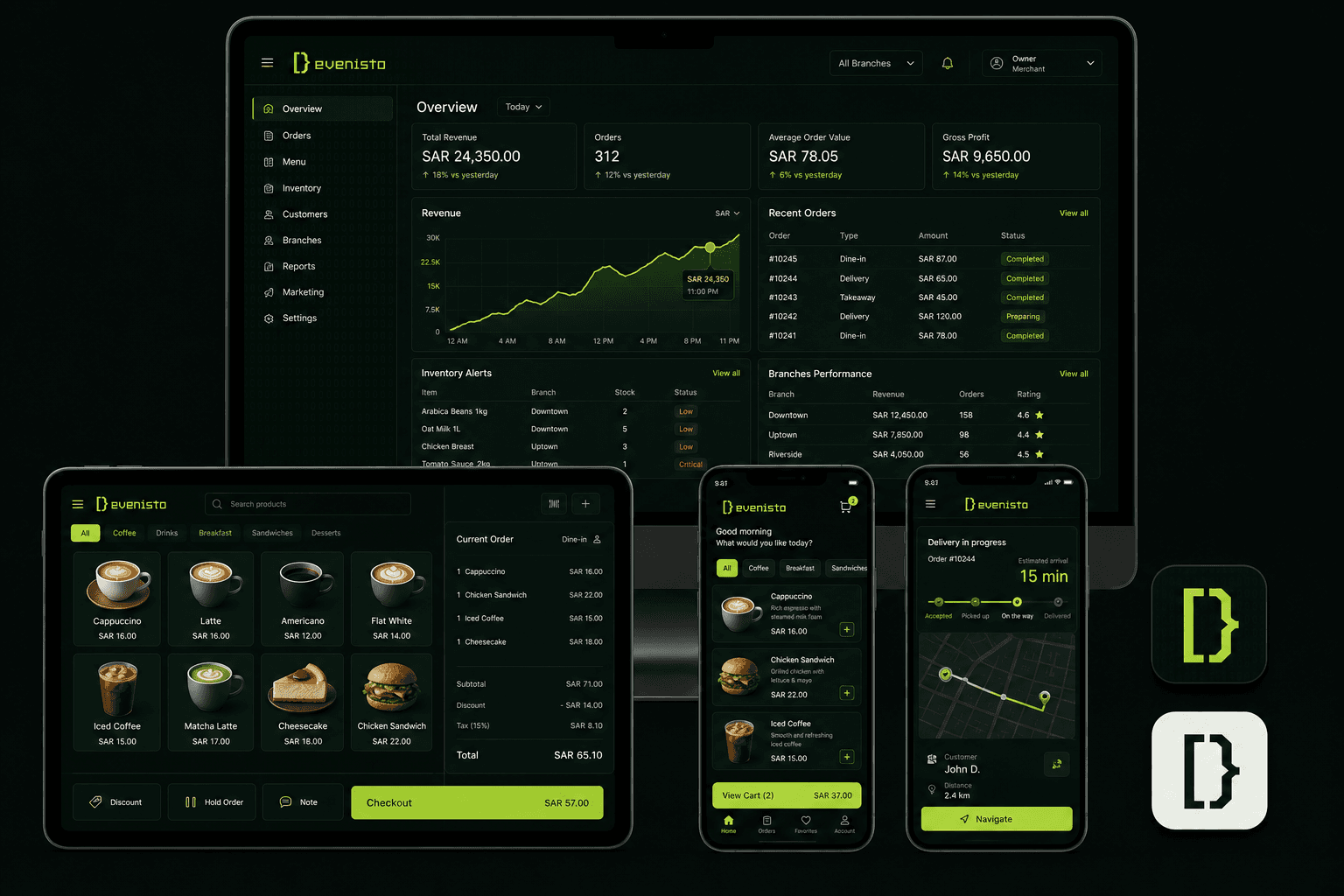
From the moment a guest orders to the moment the owner reads the report: a store in your identity, a cashier that never stalls, a kitchen that knows its part, and a driver who delivers. Every order passes through everyone, and every number comes back to you.
Customer, owner, cashier and driver each see what is theirs, and all of them see the same order in the same second.
Customer01 / 04
Customer storefront
A standalone site per brand on its own host: branch catalogue, server-priced cart, live order tracking, points and wallet.
Preparing
Owner02 / 04
Owner dashboard
Brands, branches, staff and roles, catalogue and inventory, coupons and promotions, reports, and full control of the store theme.
Stock: low ×2
Branch03 / 04
Branch POS
A fast touch screen for orders, preparation and payment in cash, card or split, with shifts, X/Z reports and audited refunds.
#1042New
#1041Preparing
#1039Ready
Charge
Delivery04 / 04
Driver app
Receives and accepts deliveries, follows pickup, customer and route details, and updates status through proof of delivery.
Delivered
02 · The journey
One order, from the table to the books
Follow the order's signal as it passes through every hand on your team without being typed twice or lost on the way.
01
The customer orders
From the store, by scanning a table code without an account, or from a connected delivery platform.
02
The cashier receives it
An instant chime, and the order shows with its status, table and source on the branch screen.
03
The kitchen prepares
A kitchen display by station: bar, hot, cold. Each sees its own lines, and recipes draw down stock.
04
Payment and handover
Cash, card or a bill split by seat, a tip, then pickup or a driver through proof of delivery.
05
The report completes
Sales, items, waste and menu engineering, with loyalty points credited to the customer automatically.
03 · By the numbers
Facts, not promises
4interfaces: customer, owner, cashier, driver
5order types per branch
4customisable store themes
18operational and financial reports for merchants
2languages from day one
04 · Identity
Four themes, unlimited identity
Classic, Minimal, Bold and Catalog — pick a template, shape it to your brand, and publish instantly.
Classic
NOIR CAFÉ
Weekend breakfast
🥐
Butter croissant18
☕
Flat white16
Minimal
STILLMENU
☕
Cold brew19
🥗
Green bowl32
🍰
Cheesecake24
Bold
BIG FLAVOUR. ZERO WAIT.
🍔
Double smash39
🍟
Loaded fries22
Catalog
THE PANTRY
🍕
Margherita44
🍝
Pasta38
🥤
Soda9
🍮
Dessert21
The previews here are rendered from the project's real templates — no mock screenshots.
✓Primary, secondary and button colors
✓Arabic typography from a curated font list
✓Texts, images and the cover photo
✓Sections on/off and their order: hero, categories, featured, offers, branches, loyalty banner
✓Background opacity, radius and spacing
✓Light and dark appearance together
05 · Order types
Every ordering method your branch needs
Enable the right services for each branch and manage every order in one place.
Pickup
Orders prepared for quick counter collection.
In-branch orders
Orders reach the cashier directly and stay visible to the team.
Delivery
Enable it only for branches that offer delivery.
Curbside pickup
Customers confirm arrival from their order page and the cashier is alerted instantly.
Scheduled orders
Customers choose a collection time from the available slots.
✓A per-branch preparation time shown to the customer before ordering
✓Branch states: open, busy, temporarily closed, closed — with a reason customers can see
✓Order status updates live for the customer, the dashboard and the cashier at once
06 · Plans
Two plans, sized to you
Two clear plans, a 14-day trial, and no setup fees. Pricing is shared when we talk, before any commitment.
01
One subscription, not two
The till, the store, the kitchen screen and the driver app are one system. You do not buy a POS from one company and an ordering channel from another and then pay to connect them.
02
The order is written once
From the site, the table or the till, the same order flows through the kitchen, delivery and reports without anyone re-entering it.
03
We activate it with you
No form waiting in an inbox. We activate your account within one business day and stay with you until the first real order.
Launch
For one brand opening its digital door today.
14-day free trial
✓One brand, up to 3 branches
✓Up to 200 products and 10 staff
✓A store in your identity on an instant subdomain
✓The branch cashier, all of it
✓Orders, invoices and core reports
✓Coupons and loyalty points
✓Custom roles and file exports
Limits
Brands1
Branches3
Staff10
Products200
Customer store
A store in your identity on an instant subdomain✓
Your own domain per brand—
Four customisable themes✓
Five order types: dine-in, pickup, curbside, delivery, shipping✓